Your CRM Is Only as Good as What It’s Connected To
A CRM sitting by itself, disconnected from everything else you use, is really just an expensive contact list. The real value shows up when it’s actually talking to your booking calendar, your invoicing tool, and wherever your leads come from — so a new enquiry doesn’t require someone to manually copy it from one place to another before anything happens.
Most of the “productivity gains” people expect from a CRM don’t come from the CRM itself. They come from what it’s connected to.
The Connections That Actually Matter
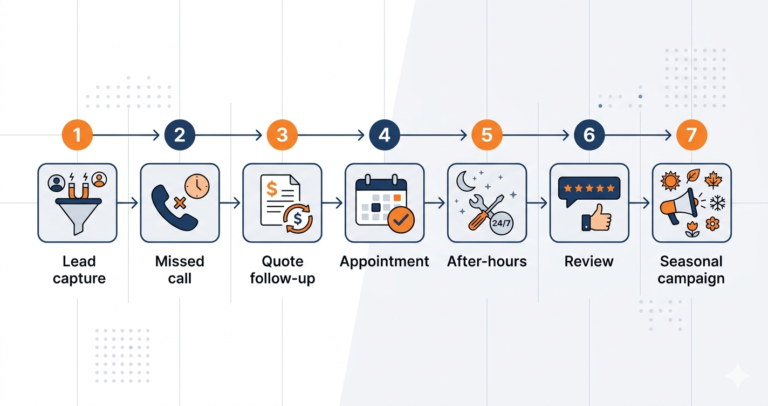
Lead capture into the CRM, instantly. A Facebook lead ad or a Google Local Service Ads enquiry that sits in a separate dashboard for a day before anyone sees it is a lead that’s already going cold. Getting these to land directly in your CRM the moment they come in — with an automated first response firing immediately — is usually the single highest-impact connection you can set up, especially when you’re paying real money per lead.
Booking and scheduling. When a calendar tool talks to the CRM, a new appointment automatically creates the contact record and queues up reminder messages, instead of someone manually entering the same information twice.
SMS. Text messages get read — open rates are absurdly high compared to email — and having two-way texting live inside the CRM means conversations are logged against the right contact instead of scattered across someone’s personal phone.
Invoicing and payments. Connecting to a tool like QuickBooks or Stripe means payment status is visible right next to the client record, and you can trigger a review request the moment a job is actually paid for rather than guessing when it’s appropriate.
Call tracking. If phone calls are a big part of how leads come in, having calls logged automatically against contact records — and missed calls triggering a follow-up text — closes a gap a lot of businesses don’t realize they have.
Which Platforms Make This Easiest
GoHighLevel builds most of the above natively — SMS, booking, pipeline, and call tracking all live inside one platform, which cuts down on the number of separate subscriptions and Zapier connections you need to maintain. The tradeoff is a steeper setup and higher cost, covered in more depth in our GoHighLevel review.
Zoho CRM takes a different approach — a broad ecosystem (Bookings, Invoice, Desk, Cliq) plus solid third-party connections through its Marketplace and Zapier. If you’re already using other Zoho products, or want flexibility without being locked into one all-in-one platform, this tends to be the better fit.
For businesses in the trades specifically, Housecall Pro and Jobber both integrate cleanly with the tools that actually matter for field service — QuickBooks, Stripe, Google LSA, Google Calendar — without the broader complexity of a full marketing platform.
And Pipedrive is worth mentioning for anyone who wants a well-connected pipeline CRM without replacing their existing stack — its app marketplace and open API make it easy to plug into whatever you’re already running, starting at $14/user/month.
Where a native integration doesn’t exist for a specific tool, Zapier or Make fills most gaps — budget somewhere around $20–50/month if you end up relying on it for a handful of automations.
Where to Actually Start
Don’t try to connect everything at once. In rough order of impact:
- Lead capture into the CRM — this has the fastest, most obvious payoff, especially if you’re running paid ads
- Booking and scheduling — cuts double data entry and reduces no-shows through automated reminders
- Payment status — improves collection and lets you trigger review requests at the right moment
- Review request automation — builds your Google rating without anyone having to remember to ask
- Call tracking — closes the gap for businesses where a lot of leads come by phone
Get the first one working, confirm it’s actually helping, then layer in the next. Trying to wire up an entire stack in one weekend usually means nothing gets finished properly.
For related reading, see our guides on CRM for Facebook leads and CRM with automated text messaging.
Affiliate Disclosure: This article contains affiliate links. If you click through and make a purchase, we may earn a commission at no additional cost to you. We only recommend products we believe add real value to our readers.