7 Essential CRM Workflows for Home Service Businesses That Boost Revenue on Autopilot (2026)
Most home service businesses run on memory and text threads — a lead here, a quote there, a job tracked in someone’s head rather than any system. It works fine until it doesn’t: a missed follow-up costs a job, a forgotten appointment costs a client, a quote that sat unanswered for two weeks costs revenue that a single check-in message would have recovered.
The fix isn’t hiring an assistant to chase all of this manually — it’s building a small number of automated workflows that run the same way whether you’re on a roof, asleep, or drowning in 80 leads after a storm. Here are the seven worth having.
🚀 Build your first CRM workflow today
Systeme.io gives you visual workflow automation, pipeline management, and email sequences — everything you need to systematise your home service business for free.
What a workflow actually is
A CRM workflow is simply a set of actions that fire automatically off a specific trigger — when X happens, the system does Y and Z without anyone touching it. Workflow automation cuts manual task time by 30–45% in small businesses on average, and for an owner who’s also the technician, that saved time is billable hours, not just convenience. Businesses running these workflows see a roughly 29% lift in sales and a 34% improvement in customer satisfaction. The difference is simple: the system runs when you’re on a roof, at midnight, during a storm surge. A person can’t.
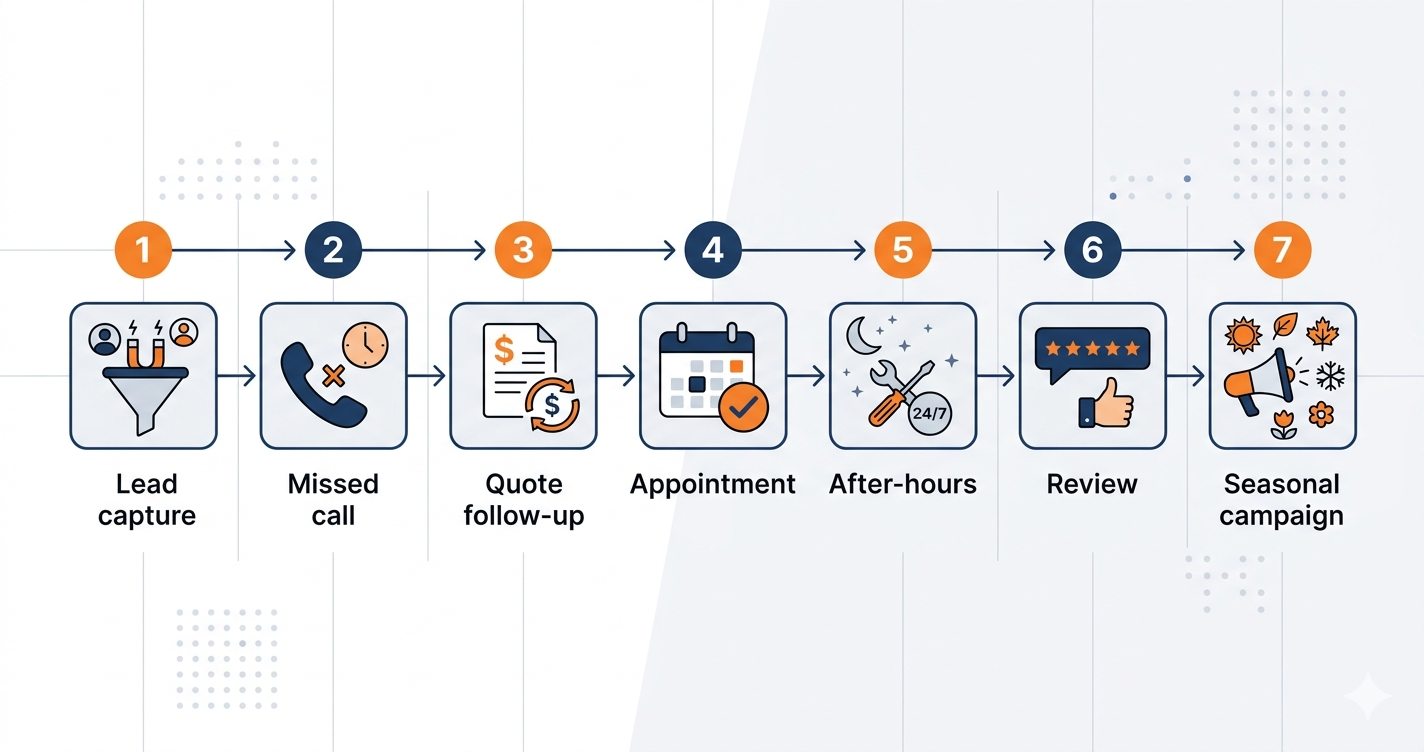
The seven workflows worth building
1. New lead capture and instant response
Trigger: new lead submitted — web form, Facebook ad, Google LSA, phone call
Actions:
- Create a contact record tagged with source
- Instant SMS: “Hi [Name], thanks for getting in touch! We’ll call you within 15 minutes. What service do you need? — [Business]”
- Confirmation email with service overview and booking link
- Push notification to the assigned rep
- Pipeline task: “Call [Name] within 15 minutes”
This is the foundation workflow. Speed-to-lead is the single biggest variable in conversion rate, and this ensures every lead hears from you within minutes regardless of what else is happening.
2. Missed call recovery
Trigger: inbound call unanswered
Actions:
- SMS within 60 seconds: “Sorry we missed your call! We’re with a client right now. What can we help you with? — [Business]”
- Create a lead record in “Missed Call” pipeline stage
- Alert a team member to call back within 15 minutes
- Second SMS with a booking link if no reply after 30 minutes
See our full guide on missed call automation for the complete setup.
3. Quote follow-up sequence
Trigger: deal moved to “Estimate Sent”
Actions:
- Day 2: SMS check-in
- Day 5: email with project photos and a testimonial
- Day 10: SMS availability nudge
- Day 21: final SMS
- If accepted, move to “Booked” and trigger the booking workflow
This is the highest-revenue-impact workflow of the seven. For the full sequence with exact message templates, see how to automate estimates and quotes.
4. Appointment confirmation and reminder
Trigger: appointment booked
Actions:
- Immediate confirmation SMS + email with date, time, address
- 48 hours before: SMS reminder with confirm/reschedule link
- 2 hours before: “Your appointment is today at [time]”
- If cancelled: notify the team and trigger a reschedule sequence
5. After-hours lead response
Trigger: lead arrives outside business hours
Actions:
- Immediate SMS acknowledging the enquiry, setting a morning callback expectation, with a booking link
- Immediate email with service overview and booking link
- Tag as “After Hours” in the pipeline
- 8am team alert listing all overnight leads
- 10am follow-up SMS if no contact’s been made
See our full guide on after-hours lead response.
6. Job completion and review request
Trigger: job marked complete
Actions:
- 24 hours after: SMS review request with a Google review link
- 7 days after: email referral request
- 11 months after: annual maintenance reminder
- Move contact to “Past Customer” for seasonal campaigns
7. Seasonal re-engagement campaign
Trigger: time-based (e.g. 1 March for spring, 1 October for pre-winter)
Actions:
- Filter past customers by service type and recency
- Personalised SMS with a booking link
- Follow-up email 3 days later for non-responders
- Tag respondents as active leads, move into the booking workflow
💡 Build all 7 workflows in Systeme.io
Systeme.io’s visual workflow builder lets you create all 7 essential workflows — with email, SMS, and pipeline automation — on the free plan.
Platform comparison
| Platform | Workflow builder | SMS workflows | Starting price |
|---|---|---|---|
| GoHighLevel | Visual, powerful | Native | $97/month |
| Zoho CRM | Rule-based + Blueprint | Via integration | $14/user/month |
| Systeme.io | Visual automations | Via integrations | Free / $27/month |
| Jobber | Job-based automations | Built-in | $49/month |
GoHighLevel handles all seven natively. Zoho is strongest for growing teams needing conditional logic. Systeme.io covers workflows 1, 3, 4, 6, and 7 on its free plan. Jobber handles 4 and 6 natively.
✅ Zoho CRM: enterprise workflow automation for growing home service teams
Zoho’s Blueprint workflow engine handles complex conditional sequences, multi-step approvals, and team task assignments across all 7 essential workflows.
Which order to build them in
- Missed call recovery — immediate revenue recovery, zero ongoing maintenance
- New lead instant response — ensures every lead hears from you within minutes
- Quote follow-up — closes more of the pipeline you already have
- Appointment reminders — eliminates no-shows and wasted travel time
- After-hours response — captures evening and weekend enquiries
- Review request — builds Google rankings passively over time
- Seasonal campaigns — most valuable once you have 100+ past customers
Don’t build all seven at once. The first two alone typically deliver more revenue in month one than the platform costs for the whole year.
What full implementation is worth
- Missed call recovery: 3 extra bookings/week at $250 — $3,000/month
- Quote follow-up: close rate 22% → 34% on 20 monthly quotes at $500 — +$1,200/month
- No-show reduction: 3 fewer no-shows/month at $300 — +$900/month
- After-hours recovery: 4 extra bookings/week at $200 — +$3,200/month
- Seasonal campaigns: 1 campaign/quarter generating 10 bookings at $400 — +$16,000/year
The two mistakes that undo all of this
Building everything at once. Owners set up all seven before any are properly tested, then abandon the whole system the moment one breaks. Build one, run it two weeks, measure the result, then add the next — each stays clean and delivering value before complexity gets added on top.
Writing robotic messages. Every SMS and email should read like a real person wrote it — conversational, warm, using the client’s first name. Test each one by asking: would I be happy receiving this? If not, rewrite it.
📈 Start systematising your home service business today
Systeme.io’s free plan includes visual workflow automation, email sequences, and pipeline management — everything you need to build your first 5 essential workflows.
Pipedrive — visibility across every stage
Pipedrive complements the seven workflows above by showing exactly where every deal sits — how long it’s been in each stage, what’s next, which deals need attention today. Its deal rotting alerts flag anything that’s stalled mid-sequence, and activity reminders make sure the human touchpoints actually happen on time. From $14/user/month.
🔧 Pipedrive: the visual CRM built for closing deals
Pipedrive’s drag-and-drop pipeline gives you instant visibility over every lead, quote, and follow-up — so nothing slips through the cracks. From $14/user/month.
Compare our top CRM picks
Frequently asked questions
How long does setup actually take?
The first two — new lead response and missed call recovery — can be set up in 1–2 hours on most platforms. All seven takes 6–12 hours spread over a week; GoHighLevel’s pre-built templates cut that time significantly.
Do I need technical skills to build these?
No — the leading platforms use visual drag-and-drop builders. If you can describe what you want to happen in plain English, you can build it.
What’s the difference between a workflow and a simple automation?
A simple automation does one thing when triggered. A workflow is a multi-step sequence with conditional logic that keeps running until the lead converts or the sequence completes.
How do I know if it’s actually working?
Track four things: average first response time, lead-to-booking conversion rate, no-show rate, and monthly review count. All four should visibly improve within the first 30 days if it’s working.
The bottom line
Build missed call recovery and quote follow-up first — they’re the fastest payback. For AI-powered enhancements on top of these, see AI CRM for home service businesses, and for the underlying problem these workflows solve, why service businesses never follow up fast enough.