How to Follow Up on Unsold Estimates (Scripts That Win Jobs)
A homeowner asked three plumbers for a quote on repiping their kitchen. Two never heard back from them again after sending the estimate. The third called two days later, sent a photo of a similar job the following week, and got the contract — not because the price was lower, but because they were the only one who stayed in the conversation. That’s the entire story behind most unsold estimates: the job wasn’t lost on price, it was lost on silence.
In most cases the customer hadn’t chosen anyone else yet. They were still deciding, and nobody gave them a reason to decide. This guide gives you the four-touch sequence, the exact messages for each touch, replies for the three objections that stall most quotes, and how to set it up so it runs without you remembering.
Editor’s choice for quote follow-up: Pipedrive
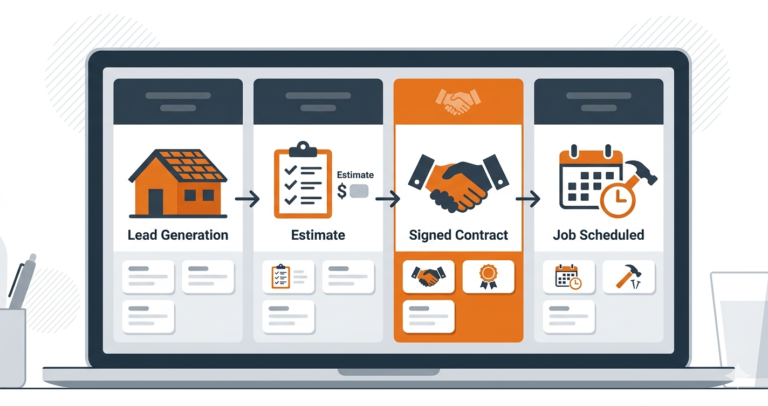
Every estimate sits on a visual pipeline, and any quote with no activity for a few days is flagged so it can’t go quietly cold. Built for trades that win work through quotes.
Why the follow-up gets skipped in the first place
It’s rarely a lack of intention. Most owners plan to circle back on a quote. Then a job runs long, a supplier call comes in, or three new leads land in the same afternoon — and the estimate from Tuesday quietly slides off the to-do list. By the time anyone remembers, the moment has passed and the prospect has moved on to whoever did call back.
Run the numbers on a mid-size operation: 20 estimates a month, a 30% close rate with no structured follow-up, versus 45% with one. At an $800 average job, that gap is worth roughly $2,400 a month — recovered from work you’d already quoted, not new leads you’d have to generate.
The fix isn’t willpower. It’s taking the follow-up out of anyone’s memory and putting it on a system that fires on schedule regardless of how the week is going.
What’s actually behind the silence
Most experienced estimators already sense this: an unanswered quote is rarely a rejection. It’s usually one of five things:
- Still comparing — two or three other quotes are sitting in the same inbox
- Genuinely forgot — the urgency that prompted the call faded once life got busy
- A question they never asked — something in the quote wasn’t clear and they didn’t want to seem difficult
- Cost hesitation — they want the work done, they’re just not sure about the number yet
- Not a solo decision — a partner or co-owner needs to weigh in first
A good follow-up sequence quietly addresses all five without ever sounding like a sequence — it should read like someone remembered them, not like a script fired at them.
Ready to stop losing quotes?
If several people send estimates, Zoho CRM can fire the whole sequence from one pipeline stage. Free edition for up to 3 users; workflow automation on paid editions.
The 4-touch sequence
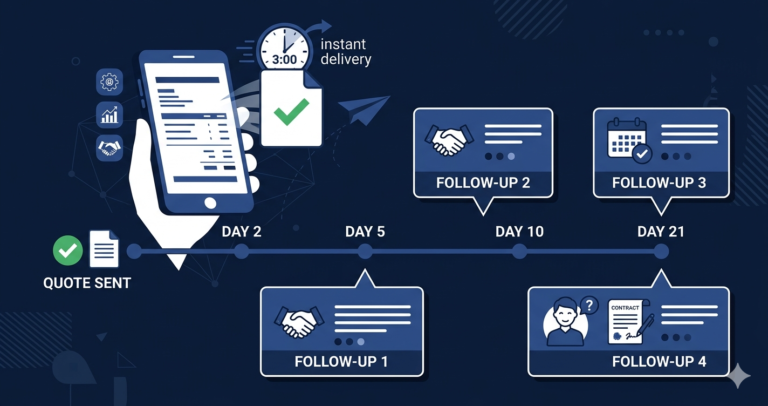
This is the sequence that converts best across most trades once it’s running automatically — triggered the moment a deal moves into “Estimate Sent” in your pipeline.
Day 2 — the check-in
Channel: SMS. Highest open rate, lowest friction.
“Hi [Name], just checking you received our estimate for [job description]. Happy to answer any questions on materials, timeline, or anything else — just reply here or call us on [number].”
This one line does a lot of quiet work: it confirms the estimate landed, and it gives them an easy opening to ask the question they were too polite to raise on the call.
Day 5 — the evidence
Channel: Email, subject line “What to expect from [Your Business Name]”
Two or three photos from a comparable recent job, one short testimonial, and a brief reminder of what sets you apart — warranty length, insurance, response time. No mention of price. The goal here is reassurance, not a repeat pitch.
Day 10 — the availability nudge
Channel: SMS
“Hi [Name], we have availability starting [date range] and are starting to schedule jobs. Happy to hold your slot this week if you’d like — no commitment needed yet, just a provisional booking.”
This isn’t manufactured urgency — most service businesses genuinely do have limited scheduling windows, and naming that fact honestly moves fence-sitters to act.
Day 21 — the graceful close
Channel: SMS
“Hi [Name], our estimate is valid for 30 days. Is there anything I can clarify before it expires? No pressure either way — just want to make sure you have everything you need to decide.”
The expiry date does the closing for you. “No pressure either way” lowers resistance enough that procrastinators who’ve been meaning to reply finally do.
🔧 Try Pipedrive Free
Visual pipeline with deal rotting alerts — never miss a follow-up on an unsold estimate. From $14/user/month.
Copy-paste scripts for the moments that stall a quote
The four touches above cover silence. These cover the replies that stop a quote in its tracks. Save them as templates in whatever tool you use so they’re one tap away.
The day 5 email, written out
Subject: What to expect from [Business Name]
“Hi [Name], thanks again for having us out to look at [job]. I thought it might help to see a similar job we finished last month (photos below). A couple of things customers usually ask about: every job comes with a [X]-year workmanship guarantee, we’re fully insured, and you’ll have one person to call from start to finish. If anything in the estimate isn’t clear, just reply to this email and I’ll explain it. [Your name], [phone]”
When they say the price is higher than expected
“Thanks for being straight with me, that helps. Can I ask what you’re comparing it with? If another quote leaves out [materials / warranty / clean-up], I’m happy to walk you through the difference. And if the budget is fixed, we can look at doing [phase 1] now and [phase 2] later so you’re not paying for everything at once.”
Don’t discount in the first reply. Find out what the number is being compared with, then offer a different scope before a different price.
When they need to talk to a partner first
“Of course, it’s a big decision. Would it help if I sent a one-page summary you can both look at? I’m also happy to do a quick call when you’re both free so you can ask me anything directly.”
Then set a follow-up task for three days later. The partner who wasn’t at the appointment is often the one with the unanswered question.
The voicemail when they don’t pick up
“Hi [Name], it’s [your name] from [Business], calling about the estimate for [job]. No need to call back if you’re busy, I’ll send you a quick text so you can reply whenever suits. Thanks!”
Keep it under 20 seconds and always follow it with the text, because most people will reply to the text, not the voicemail.
When they’ve gone with someone else
“Thanks for letting me know, I really appreciate it. If you don’t mind me asking, was it mainly price, timing or something else? It helps us get better. And if anything changes, we’re always happy to help.”
Mark the deal as lost with the reason. After a few months the reasons show you whether you have a pricing problem, a speed problem or a trust problem, and each has a different fix.
After day 21: don’t write them off
If there’s still no response, shift to a slower nurture cadence rather than dropping the lead entirely.
Day 45: a short seasonal nudge — “With [season] coming up, it’s a good time to get [job type] scheduled before our books fill.”
Day 90: a final, low-pressure check-in — “We’ll be in your area next [week/month] and wanted to check if [job description] is still something you’d like to move forward on. Happy to revisit the estimate if anything’s changed.”
Prospects who respond at 45 or 90 days are often the most committed of the bunch — they’ve been sitting on the decision the whole time and needed the right moment to land.
Quick self-check: is your follow-up actually working?
Before adding more touches, answer these three questions honestly:
- Do you know your current follow-up close rate? If you can’t answer this in ten seconds, you’re not tracking it — and you can’t improve what you don’t measure.
- Is every touch going out on the same channel? Email-only follow-up misses the prospects who barely check their inbox. If you’re not mixing SMS in, you’re leaving conversions on the table.
- Are you stopping after touch one or two? Most reps give up far too early — most conversions actually land between the third and fifth touch, right when most people have already quit.
Tools that run this automatically
You can run this sequence from a notebook and your phone’s calendar. It works, right up until a busy week. A CRM makes each touch fire from the pipeline stage instead of from memory. Which one fits depends on how you win work.
Pipedrive: for trades that win work through quotes
If you send a lot of estimates and the follow-up decides who gets the job (roofing, remodelling, solar, larger plumbing and electrical work), Pipedrive is built for you. Every quote sits on a visual board, activity reminders schedule each touch, and deal rotting turns any quote red once it has gone a set number of days without contact. Not for: businesses that mainly need booking and reminders rather than a sales pipeline. Texting runs through an integration rather than natively.
Zoho CRM: for teams sending high volume
Zoho’s workflow rules can trigger the whole sequence the moment a deal moves into “Estimate Sent”: the email touches go out automatically and the SMS touches can be sent through an SMS integration or created as call-and-text tasks for whoever owns the quote. The free edition covers up to 3 users. Not for: a solo owner who wants something running this afternoon, because setup takes longer than the other two.
Systeme.io: for getting started today
Systeme.io’s automation rules and email sequences can have the email side of this sequence running quickly, free for up to 2,000 contacts. It doesn’t send SMS natively, so for the text touches you’d send from your phone when its task reminder comes up. Not for: teams that need a shared quote pipeline with several estimators.
🚀 Try Systeme.io Free
Build automated estimate follow-up sequences in under an hour. Free for up to 2,000 contacts — no credit card required.
Mistakes that undo a good sequence
Messaging daily. Four touches over three weeks is persistent without becoming annoying. Daily contact reads as desperate and can cost you the job outright.
Sticking to one channel. Email-only follow-up quietly loses everyone who doesn’t check their inbox regularly. SMS gets read; use both.
Making every message about you. “Just checking if you’ve decided” is about your pipeline, not their problem. Frame each touch around helping them decide — answering a question, showing proof, offering convenience.
Quitting after one attempt. The uncomfortable truth is that most competitors stop after a single follow-up. Anyone still in the conversation by touch three is already ahead of most of the field.
Not measuring any of it. Without a CRM tracking this, you can’t tell which touch is actually converting or how many estimates are quietly going cold each month.
What this is actually worth
Invesp’s research puts it plainly: the large majority of sales need multiple follow-up touches before they close. Here’s how that plays out on a typical month:
- 20 estimates sent
- 25% close rate with no follow-up — 5 jobs
- 40% close rate with the 4-touch sequence — 8 jobs
- 3 extra jobs a month, at $1,000 average — +$3,000/month
- Running cost: $0–$27/month
For trades with higher ticket sizes — roofing, solar, HVAC replacement — the same math scales up fast. A roofing company at an $8,000 average job recovering just 3 extra jobs a month is looking at roughly $24,000/month in recovered revenue, from a system that costs less than a tank of gas to run.
Frequently asked questions
How many follow-ups is too many?
Four touches spread across 21 days is the sweet spot for most trades — enough persistence to convert the fence-sitters without tipping into annoying. After that, drop to a slower cadence (45 and 90 days) rather than stopping entirely.
What’s the best mix of channels?
SMS for the day 2 check-in and the later nudges, email for the day 5 evidence message (the full wording is in the scripts section above). SMS gets opened fast; email gives you room for photos and testimonials that don’t fit in a text.
Can this run without me doing anything manually?
Mostly. Zoho CRM and Pipedrive can start the sequence automatically when a deal moves to “Estimate Sent”, and the email touches go out on their own. Automatic texts need an SMS integration; without one, the CRM creates a reminder and you send the text from your phone in ten seconds. See our guide on automating estimates and quotes with a CRM for more on setup.
What should the actual wording say?
Keep it short and aimed at removing a specific objection — an unanswered question, comparison fatigue, simple procrastination — rather than a generic “have you decided?” Reference the specific job so it’s clear you remember the conversation, and always leave an easy way to reply or book.
Compare our top CRM picks for estimate follow-up
Zoho CRM
Free edition for 3 users. Workflow automation for follow-ups. Workflows on paid editions.
Related guides
- How to automate estimates and quotes with a CRM
- How slow lead follow-up is costing your business
- Missed-call text-back: how to set it up
- Roofing sales pipeline management
- Best CRM for contractors
Affiliate Disclosure: This article contains affiliate links. We may earn a commission if you make a purchase, at no extra cost to you. We only recommend tools we genuinely believe provide value.