CRM automations for contractors

8 CRM Automations for Contractors That Save 10+ Hours Every Week (2026)

Most contractors are losing 10+ hours a week to tasks a CRM could handle automatically. Chasing unpaid invoices. Manually texting appointment reminders. Calling back missed enquiries hours after they came in. Typing the same follow-up email for the tenth time. These aren’t skilled tasks — they’re repetitive admin that erodes your most valuable resource: time on the tools.

The right CRM automations for contractors eliminate this hidden time tax entirely. Set them up once, and they run indefinitely — following up on leads, confirming bookings, chasing estimates, and recovering missed calls while you focus on the work that actually earns money.

This guide covers the 8 most impactful CRM automations for contractors in 2026, the platforms that deliver them best, and the exact setup logic for each one.

🚀 Build your contractor automations today

Systeme.io gives you email sequences, pipeline automation, and lead follow-up tools built for contractors — free to start, no technical knowledge required.

Try Systeme.io Free →

Why CRM Automations Are a Game-Changer for Contractors

Contractors face a unique operational challenge. Unlike office-based businesses, you can’t step away from a job to answer a call, follow up on a quote, or chase an invoice. You’re on-site, focused, and unavailable — and every interruption has a real cost.

Industry research consistently shows that contractors spend 15–20% of their working week on administrative tasks that could be automated. For a sole trader billing £500/day, that’s £375–500 in weekly revenue lost to admin.

Well-configured CRM automations for contractors reclaim that time. They don’t replace relationships — they handle the mechanical repetition around them, so your personal attention goes to the client conversations that actually require a human.

The 8 Essential CRM Automations for Contractors

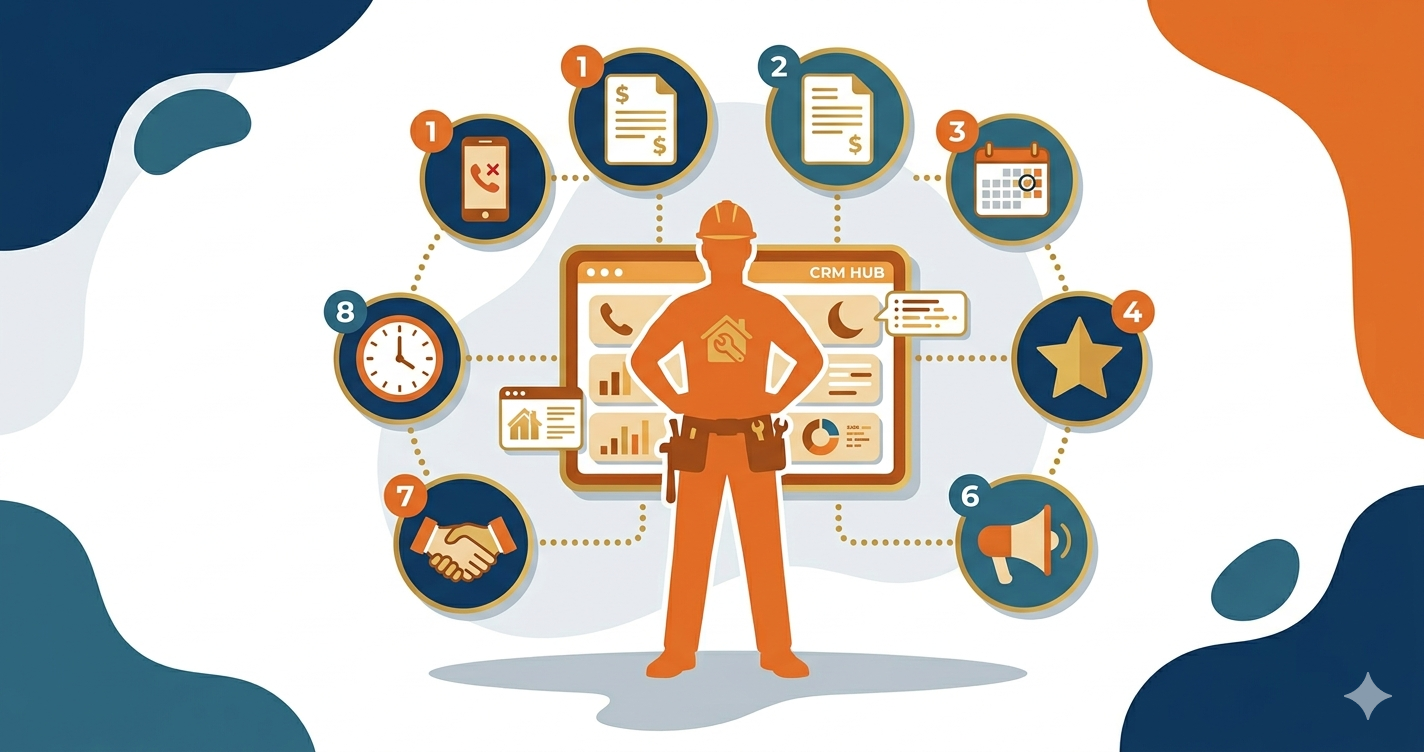
1. Missed Call Text-Back

The single highest-ROI automation available. When a call goes unanswered while you’re on the tools, an SMS fires within 60 seconds:

“Hi, sorry I missed your call! I’m with a client right now. I’ll call you back within the hour — what’s the job? — [Your Name]”

This is the foundation of all CRM automations for contractors because it recovers the leads you’re physically unable to capture while working. GoHighLevel’s native missed call text-back runs this automatically on every unanswered call. Without it, 80%+ of missed callers dial a competitor before you see the notification.

2. New Lead Instant Response

When a lead submits a web form, Facebook Lead Ad, or Google LSA enquiry, an automatic SMS and email fire within 2 minutes. The SMS acknowledges the enquiry and sets a callback expectation. The email includes your credentials, recent project photos, and a booking link.

Speed-to-lead is the most critical variable in lead conversion for contractors. Studies show response rates drop 80% after the first hour. This automation ensures every lead hears from you within minutes regardless of what you’re doing.

3. Estimate Follow-Up Sequence

Most contractors send a quote and either call once or wait passively. This is where the majority of contractor revenue leaks. A proper CRM automations for contractors estimate sequence looks like this:

  • Day 2: SMS — “Hi [Name], just checking you received my quote. Happy to answer any questions about materials, timeline, or the specification. Just reply here.”
  • Day 5: Email with a recent project photo, a testimonial, and an FAQ addressing common objections
  • Day 10: SMS — “Hi [Name], I’m booking up [month] now — I can hold your slot this week if you’d like to go ahead.”
  • Day 21: Final SMS — “[Name], my quote is valid for 30 days. No pressure — just let me know if you have any questions.”

Contractors using this CRM automations for contractors sequence consistently see estimate close rates improve from 20–25% to 32–38%.

4. Appointment Reminder Sequence

Two automated SMS messages fire before every appointment: one 24 hours before and one 2 hours before. Each includes the date, time, address confirmation, and a reschedule link.

For contractors, a no-show means a wasted half-day of travel and setup time. This automation reduces no-shows by 40–60%. On a schedule of 20 monthly appointments, recovering 3–4 no-shows per month translates directly to billable time recovered.

5. After-Hours Lead Response

Leads arriving outside business hours get a time-appropriate response rather than silence. The automated message acknowledges the enquiry, sets a morning callback expectation, and provides a self-serve booking link for leads who want to act immediately.

This is one of the most underused CRM automations for contractors — many contractors set business-hours-only automations and accidentally leave all evening and weekend enquiries unanswered. A simple time-condition in your workflow fixes this entirely.

💡 All 8 automations, one platform

Systeme.io lets you build every automation on this list — missed call responses, estimate follow-ups, appointment reminders, and review requests — from one simple dashboard.

Start Free with Systeme.io →

6. Job Completion Review Request

24–48 hours after a job is marked complete, an automated SMS fires to the client:

“Hi [Name], great to have your [job type] finished! If you’re happy with the work, a quick Google review means the world to my business: [link]. Thank you so much — [Your Name]”

Contractors using this automation generate 4–6x more Google reviews than those asking manually. Over 12 months, a consistent review request automation builds a Google Business Profile that ranks above competitors and generates organic enquiries without any ad spend.

7. Referral Request Automation

7 days after job completion (once the review request has already gone), an automated email fires:

“Hi [Name], thank you again for choosing me for your [job]. If you know anyone who might need [service type], I’d really appreciate the introduction — and I always look after people who are referred to me. [Your Name]”

Referrals are the highest-quality leads a contractor can receive — pre-sold, price-tolerant, and easy to close. This automation systematically generates referral requests from every completed job rather than leaving them to chance.

8. Seasonal Campaign Automation

A database of past customers is one of the most underused assets a contractor has. Seasonal CRM automations for contractors send targeted campaigns to past clients at the right time of year:

  • Plumbers: pre-winter boiler service reminder to all customers from the past 3 years
  • Roofers: post-storm inspection offer to all customers in affected postcodes
  • Landscapers: spring garden preparation offer to all past garden clients
  • Electricians: annual EICR reminder to landlord clients

Contractors with 200+ past customers consistently generate £5,000–20,000 in additional annual revenue from a single seasonal campaign. The automation sends the message — you just handle the bookings.

Best Platforms for CRM Automations for Contractors

Platform SMS Automation Missed Call Starting Price
GoHighLevel ✅ Native ✅ Native $97/month
Systeme.io Via integrations Via Zapier Free / $27/month
Zoho CRM Via workflow Via Zoho Voice $14/user/month
Jobber ✅ Built-in ✅ Built-in $49/month

GoHighLevel is the most capable platform for CRM automations for contractors who depend on phone calls and need native SMS, missed call text-back, and AI conversation in one system. Systeme.io is the best value for contractors who primarily need email automation, estimate follow-up, and seasonal campaigns. Jobber is the strongest choice when scheduling and job management are as important as automation.

✅ Zoho CRM: Scale your contractor automations as your team grows

Zoho CRM’s workflow engine handles all 8 automations on this list, with multi-rep visibility, lead scoring, and campaign reporting as your contractor business scales.

Try Zoho CRM Free →

How to Prioritise: Which Automations to Set Up First

If you’re starting from scratch with CRM automations for contractors, implement in this order:

  1. Missed call text-back — immediate ROI, zero ongoing maintenance, recovers leads you’re currently losing daily
  2. Estimate follow-up sequence — closes more of the quotes you’re already sending without any extra selling effort
  3. Appointment reminder sequence — eliminates no-shows and the wasted time and travel they cause
  4. Review request — builds your Google ranking passively over time, compounding in value every month
  5. After-hours response — captures evening and weekend enquiries that currently go cold overnight
  6. Seasonal campaigns — once you have 100+ past customers, this is the highest-leverage revenue generator in your arsenal

ROI: What These 8 Automations Are Worth

  • Missed call recovery: 3 additional bookings/week at £300 = £3,600/month
  • Estimate close rate improvement: 20% to 34% on 12 monthly estimates at £800 = +£1,344/month
  • No-show reduction: 3 fewer/month at £400/day = +£1,200/month
  • Review-driven organic enquiries: 2 additional jobs/month at £500 = +£1,000/month
  • Seasonal campaign: 1 campaign/quarter generating 8 bookings at £600 = +£19,200/year

Total conservative estimate from fully implemented CRM automations for contractors: £7,000–10,000+ additional monthly revenue from the same customer base and marketing spend.

📈 Start recovering your 10+ lost hours this week

Systeme.io lets you build your first contractor automation in under an hour — free plan, no credit card, no complicated setup. Start today.

Get Started Free with Systeme.io →

Pipedrive: Pipeline Visibility for Contractor Sales Workflows

Alongside automation platforms, Pipedrive gives contractors a clean visual pipeline to track every quote, follow-up, and deal — complementing the automations above with structured accountability. At $14/user/month, it integrates with most automation tools via Zapier, so you can have GoHighLevel or Systeme.io handling your automated messages while Pipedrive keeps the pipeline visibility clear. Activity reminders ensure you never let a hot estimate go stale, and the mobile app makes it easy to update deal stages from your phone between jobs.

🔧 Pipedrive: The visual CRM built for closing deals

Pipedrive’s drag-and-drop pipeline gives you instant visibility over every lead, quote, and follow-up — so nothing slips through the cracks. From $14/user/month.

Try Pipedrive Free →

Compare Our Top CRM Picks for Service Businesses

Systeme.io

Free plan. Email automation, pipelines, funnels.

Try Free →

Zoho CRM

Free for 3 users. Scalable automation & scoring.

Try Free →

Pipedrive

From $14/user. Visual pipeline for sales teams.

Try Free →

Frequently Asked Questions

Do CRM automations for contractors require technical knowledge to set up?

No. Platforms like GoHighLevel and Systeme.io are designed for non-technical business owners. Most CRM automations for contractors are built using drag-and-drop workflow builders with pre-written templates. The missed call text-back on GoHighLevel, for example, is a single toggle in Settings — it takes under 5 minutes to enable.

How long does it take to see ROI from contractor CRM automations?

The missed call text-back and estimate follow-up sequence typically deliver ROI within the first week. These CRM automations for contractors are recovering revenue from leads and quotes already in your pipeline — no new marketing spend required. The review request and seasonal campaign automations compound over months.

Can I run these automations from my mobile phone?

Yes. GoHighLevel, Systeme.io, Jobber, and Zoho CRM all have mobile apps. CRM automations for contractors run automatically in the background — you only need to open the app when a lead replies or a task needs your input. The automations don’t require you to be at a computer.

What’s the difference between CRM automations and just using a spreadsheet?

A spreadsheet is passive — it stores information but doesn’t act on it. CRM automations for contractors are active — they send messages, create tasks, move leads through stages, and follow up automatically based on triggers and timing. The spreadsheet tells you what happened; the CRM makes things happen.

Conclusion: Automate the Admin, Focus on the Work

The most successful contractors in 2026 aren’t working harder — they’re working smarter. CRM automations for contractors handle the follow-up, reminders, reviews, and re-engagement that most contractors either forget or don’t have time for. The result is more revenue from the same workload.

Start with the missed call text-back and estimate follow-up sequence. Add the appointment reminder and review request. Build from there as your system matures. Every automation you implement compounds — the time and revenue impact grows month by month.

For more on CRM tools and automation strategy, see our guides on CRM missed call automation, after hours lead response CRM, and CRM integrations for service businesses.


Related Articles

Similar Posts