
How to Set Up Pipedrive for Contractors (Pipeline, Follow-Up and Rotting Alerts)
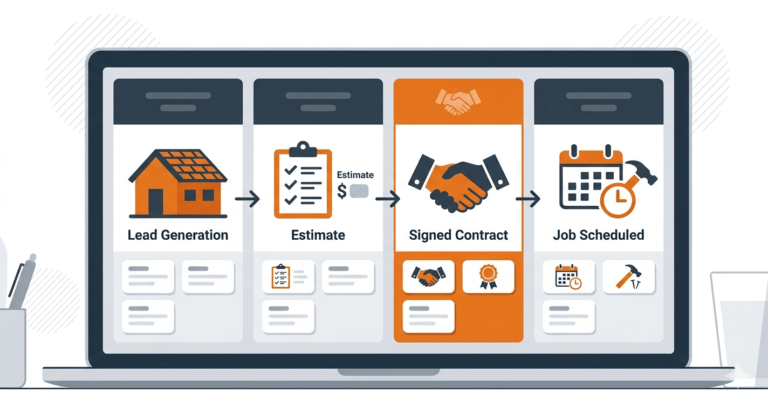
Contractors don’t lose most jobs on price. They lose them when a quote goes out and nobody follows up, when a site visit isn’t confirmed, or when a lead sits in someone’s phone for three days. Setting up Pipedrive for contractors is about stopping exactly that: every job is a deal on a board, every deal needs a next action, and anything that goes quiet gets flagged.
This guide walks through a practical Pipedrive setup for contractors, remodellers, roofers and other trades that win work through quotes: the pipeline, the fields, the follow-up activities, deal rotting and a few automations. Menu names change as Pipedrive updates its interface, and some features depend on your plan, so treat paths as a guide and check Pipedrive’s official help centre for the current screens.
Follow along with a free trial
Start a Pipedrive trial and build each step as you read. Plans start from about $14 per user per month.
Why Pipedrive for contractors works
Most contractor CRMs try to do everything: scheduling, job costing, invoicing and sales. Pipedrive does one thing, and does it well: it keeps every quote moving until it is won or lost. For a contractor whose biggest leak is follow-up after the estimate, that focus is the point.
- Visual pipeline: every open job sits in a column, so you can see at a glance what is waiting on you.
- Activities: each deal carries its next call, text or visit, with a date.
- Deal rotting: deals with no activity turn red, so stalled quotes can’t hide.
- Mobile app: log a site visit or schedule a follow-up from the van.
What you’ll build
- A pipeline that matches how your jobs move.
- Custom fields for the details you always need.
- Follow-up activities for every estimate.
- Deal rotting so stalled quotes turn red.
- Automations for the repetitive steps.
- A web form so new enquiries arrive as deals.
Step 1: build the pipeline
Rename the default stages to match your process. A setup that works for most contractors:
New lead → Contacted → Site visit booked → Estimate sent → Follow-up → Won (and Lost, which Pipedrive handles separately).

Keep it to six or seven stages. Each stage should describe something the customer has done or something you are waiting for, not an internal task. If you also do insurance work or maintenance contracts, create a second pipeline rather than mixing them in.
Step 2: custom fields
Add the fields you need on every job, for example: job type, property address, lead source, estimated value, and “quote expires on”. Make lead source required so you can see which channels win jobs.
Resist adding twenty fields on day one. Every field you make someone fill in is a reason not to log the deal at all. Start with five, and add more only when you find yourself asking the same question twice.
Step 3: an activity for every next step
The habit at the heart of Pipedrive for contractors is simple: every open deal should have a scheduled activity. When you move a deal to Estimate sent, schedule the first follow-up for day 2. When you complete it, schedule the next. The four-touch rhythm that works for most trades:
- Day 2: text or call to check they received the estimate and answer questions.
- Day 5: email with photos of a similar job and a testimonial.
- Day 10: availability: when you could start.
- Day 21: a friendly close before the quote expires.
The exact wording for each touch is in how to follow up on unsold estimates.
Step 4: turn on deal rotting
In the pipeline settings, set a rotting period for each stage, for example 2 days for New lead, 3 days for Estimate sent and 7 days for Follow-up. Deals with no activity for longer than that turn red on the board. Once a week, clear every red deal: call, schedule, or mark as lost with a reason.
Step 5: automations
Pipedrive’s automations (availability depends on plan) can take routine steps off your plate. The most useful automations in Pipedrive for contractors:
- When a deal enters Estimate sent → create the day 2 follow-up activity.
- When a deal is won → create a task to send the review request the day after the job finishes.
- When a deal is lost → create a follow-up activity in 90 days to check back in.
Step 6: bring leads in automatically
Use Pipedrive’s web forms (or its lead tools, depending on plan) on your website so enquiries arrive as leads or deals in the first stage. For Facebook and other sources, connect them through an integration or Zapier; see Facebook Lead Ads to CRM in five minutes. Pair Pipedrive with a missed-call text-back setup on your phone so callers get an instant reply too.
Common setup mistakes
- Too many stages. A pipeline with twelve columns becomes a chore to update. If two stages always happen on the same day, merge them.
- Deals without a next activity. This is the one rule that makes Pipedrive for contractors work. A deal with no scheduled activity is a deal nobody is chasing.
- Never marking deals as lost. Old quotes left open make the board look busier than it is and hide the real numbers. Close them with a reason, and let the 90-day automation bring them back.
- Only the owner uses it. If estimators keep quotes in their own notes, the pipeline is always out of date. Make updating Pipedrive part of sending every estimate.
Example: one kitchen remodel through the pipeline
Here is how a single job moves through this Pipedrive for contractors setup:
- Monday: a homeowner fills in your website form. A deal appears in New lead with the source set to “Website”.
- Monday afternoon: you call back, book a site visit for Wednesday and move the deal to Site visit booked. The visit is the deal’s next activity.
- Thursday: you send the estimate and move the deal to Estimate sent. The automation creates the day 2 follow-up.
- Saturday: the day 2 text goes out. The homeowner asks about worktop options; you answer and schedule the day 5 email.
- The following week: on day 10 you offer a start date. They accept, and you mark the deal as won.
Without the pipeline, that job depends on you remembering a homeowner’s name in the middle of a busy week. With it, the next step is always on your list.
Reports to check every Monday
Reporting is where Pipedrive for contractors pays off over a spreadsheet. Pipedrive’s Insights reports can answer the three questions that matter most for a contracting business. Check them once a week:
- Win rate by lead source: which channels bring jobs you actually win, not just enquiries.
- Deals stuck in Estimate sent: how many quotes are waiting, and for how long.
- Lost reasons: whether you lose on price, timing or silence. If “no response” tops the list, tighten your follow-up rhythm.
Using it from the van and the job site
Most contractors spend their day away from a desk, so the mobile app is where Pipedrive for contractors earns its keep. A few habits make the difference:
- Log the site visit before you drive off: photos, measurements and the customer’s priorities go straight onto the deal.
- Tick off the activity as soon as you’ve called or emailed, and schedule the next one in the same tap.
- Check the “today” list at lunch, not at 9pm, so follow-ups go out while customers are still deciding.
Five minutes a day on the phone keeps Pipedrive for contractors accurate. Skip it for a week and the board stops reflecting reality, which is when people give up on a CRM.
Adding an estimator or office manager
Once a second person handles quotes, set a few rules so nothing falls between you:
- One owner per deal. Every estimate has a named person responsible for the next step.
- Shared filters: a view of deals with no activity scheduled, checked every morning by the office.
- Handover notes: when a deal moves from estimator to scheduler, the key details go in a note, not a text.
- Weekly pipeline review: fifteen minutes on Monday going through stalled deals together.
For wider benchmarks on how residential builders and remodelers run their sales, the National Association of Home Builders publishes useful industry data.
Set up this way, Pipedrive for contractors scales from one person to a small team without changing the pipeline you already built.
When another tool fits better
Pipedrive for contractors is strongest when your income depends on quotes. If that isn’t your main bottleneck, one of these may suit you better.
Mostly repeat customers and email follow-up?
Systeme.io sends service reminders, review requests and seasonal offers automatically, free for up to 2,000 contacts.
Office team, several crews and many lead sources?
Zoho CRM routes enquiries, shares records across the team and connects to Zoho Invoice. Free edition for up to 3 users; workflow automation on paid editions.
The rule of thumb: if most of your revenue starts with a written estimate that customers think about for days or weeks, stick with Pipedrive for contractors. If most of it comes from repeat customers who simply rebook, the other two will usually serve you better for less effort.
Where Pipedrive falls short
- Pipedrive for contractors covers the sales side only: it doesn’t schedule crews or cost jobs. Pair it with field-service or project software for operations.
- Texting customers usually runs through an integration.
- Some features (automations, documents, lead tools) depend on your plan; check before you rely on them.
Ready to stop losing jobs after the estimate?
Set up the pipeline, activities and rotting once, and every quote gets followed up. Free trial.
Pipedrive for contractors: frequently asked questions
Is Pipedrive good for contractors?
Yes, if most of your work is won through quotes. Pipedrive for contractors works best as the sales system: leads, estimates and follow-up. For crew scheduling and job costing, pair it with field-service software.
How much does Pipedrive cost for a contractor?
Plans start from about $14 per user per month, with higher plans adding automations and more reporting. Usually only the people who sell or quote need a seat.
How long does this take to set up?
A couple of hours for the pipeline, fields and rotting, plus time to import your open quotes.
Can the whole crew use it?
Anyone who sells or quotes should. Crews that only do the work don’t usually need a seat.
Should I import old leads?
Import open quotes from the last few months into Estimate sent or Follow-up, and schedule a check-in for each. It’s often the fastest win.
Is Pipedrive for contractors worth it for a one-person business?
Yes, if you send more than a handful of quotes a month. The pipeline and reminders take minutes to maintain and usually win back at least one job that would otherwise have gone quiet.
Can I import my existing quotes?
Yes. Export open estimates from a spreadsheet or your quoting tool, import them as deals in the right stage, and add a next activity to each one.
Compare our top picks
Not sure Pipedrive for contractors is the right fit? If you run several estimators and need routing rules and team reporting, Zoho CRM is the alternative we recommend most often.
Related guides
More on choosing and setting up a CRM, and on getting the most from Pipedrive for contractors and other trades:
- CRM for contractors
- Pipedrive review for service businesses
- How to manage a roofing sales pipeline
- Jobber vs Pipedrive
Affiliate Disclosure: This article contains affiliate links. If you sign up through them we may earn a commission at no extra cost to you. It never decides which tool we recommend. See how we test and recommend tools.